Introduction
My goal was to create a live-chat server that doesn’t require access to the internet. Phones and computers can connect to the server directly without having internet access, I wanted to create a chat server to help people from my neighbourhood be in contact with each other during power-cuts or internet outages which are common where I live.
Features
The goal of the game is simple:
- Anyone in the range of the network can connect to it without a password.
- Connected users will have a designated colour for their IP adress.
- Users can show up in chats with their own username.
- Real time messaging.
- Intuitive web interface.
How it works
1. Setting Up the Network
The ESP32 is configured as an access point using the WiFi.softAP() method. Devices within range can connect to this network. The static IP 192.168.4.1 is assigned to the ESP32, which acts as a server and router.
2. Hosting the Web Interface
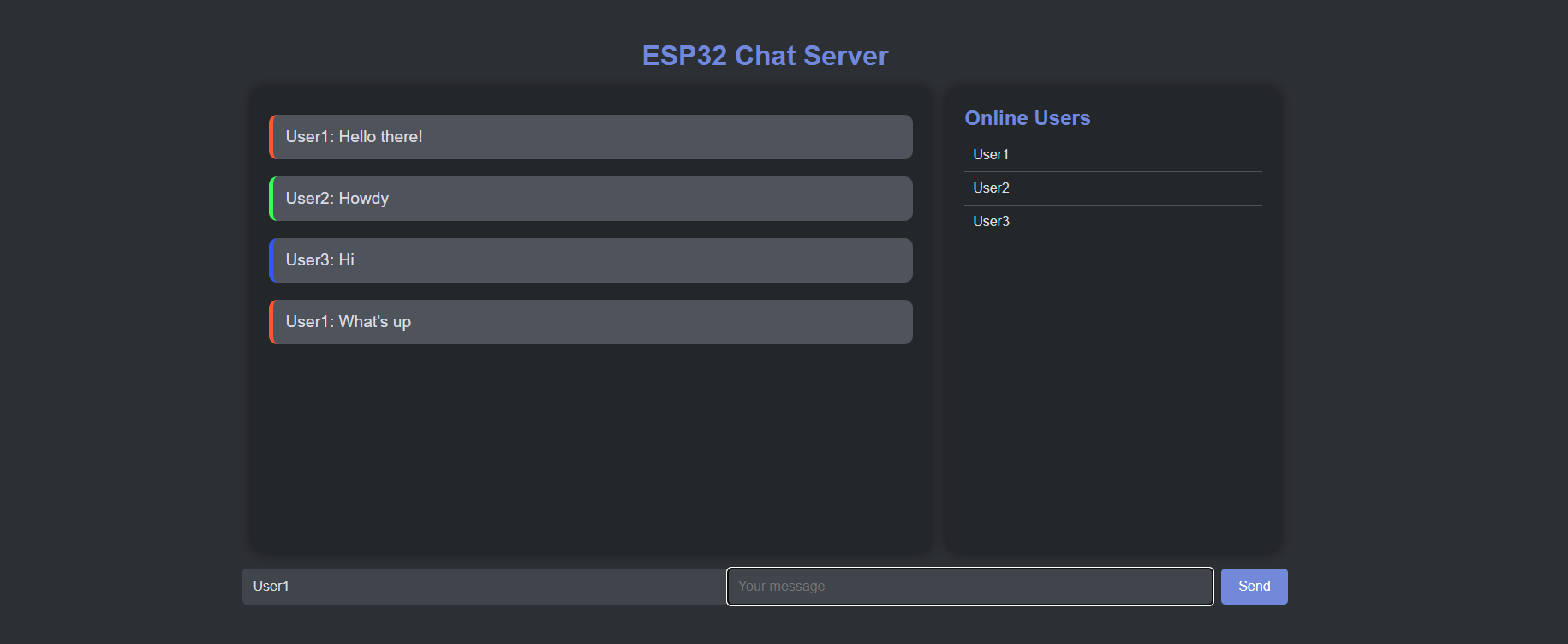
The HTML, CSS, and JavaScript for the chat interface are embedded directly in the code as a string literal (page). When users access the server via a browser, the ESP32 sends this page to the client.
3. Handling User Connections
Each user is identified by their device’s IP address, which the ESP32 obtains using server.client().remoteIP(). A color code is generated for the IP for verification of identity incase of username change.
4. Messaging service
Javascript on the page sends a POST request to the /send endpoint along with the message content.
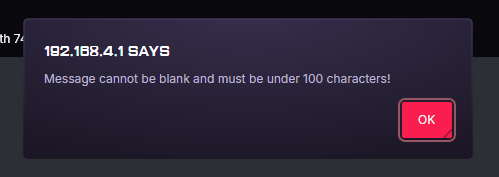
The esp32 validates the username, length and trims extra spaces in the message.
The message is finally appended to the chatlog string.
5. Dynamic updates
The javascript on the client’s side periodically requests the server for updates on the user list and messages.
Future additions
To make this project better there are a couple of things we can do.
- Chat moderation
- Chat log retention
- Accounts with verified usernames
- Extended range for esp32
- Better UI
- Faster refresh rate
Conclusion
This project is a work in process and it would be awesome to see it being used in action in the real world. I can’t wait to make it better and contribute to my neighbourhood.
Code
1
2
3
4
5
6
7
8
9
10
11
12
13
14
15
16
17
18
19
20
21
22
23
24
25
26
27
28
29
30
31
32
33
34
35
36
37
38
39
40
41
42
43
44
45
46
47
48
49
50
51
52
53
54
55
56
57
58
59
60
61
62
63
64
65
66
67
68
69
70
71
72
73
74
75
76
77
78
79
80
81
82
83
84
85
86
87
88
89
90
91
92
93
94
95
96
97
98
99
100
101
102
103
104
105
106
107
108
109
110
111
112
113
114
115
116
117
118
119
120
121
122
123
124
125
126
127
128
129
130
131
132
133
134
135
136
137
138
139
140
141
142
143
144
145
146
147
148
149
150
151
152
153
154
155
156
157
158
159
160
161
162
163
164
165
166
167
168
169
170
171
172
173
174
175
176
177
178
179
180
181
182
183
184
185
186
187
188
189
190
191
192
193
194
195
196
197
198
199
200
201
202
203
204
205
206
207
208
209
210
211
212
213
214
215
216
217
218
219
220
221
222
223
224
225
226
227
228
229
230
231
232
233
234
235
236
237
238
239
240
241
242
243
244
245
246
247
248
249
250
251
252
253
254
255
256
257
258
259
260
261
262
263
264
265
266
267
268
269
270
271
272
273
274
275
276
277
278
279
280
281
282
283
284
285
#include <WiFi.h>
#include <WebServer.h>

// Replace with your network credentials
const char* ssid = "ESP32SERVER";
const char* password = "051007";

// Create an ESP32 Web Server on port 80
WebServer server(80);

// Predefined colors for IP addresses
String colors[] = {"#FF5733", "#33FF57", "#3357FF", "#FF33A1", "#A133FF", "#FFC300", "#33FFF5", "#FF5733"};
int colorIndex = 0;

// Array to store IP addresses and their assigned colors
struct IPColor {
  String ip;
  String color;
  String name;
};
IPColor ipColors[255]; // Array to hold up to 255 IPs

// HTML code for the chat page
String page = R"rawliteral(
<!DOCTYPE html>
<html>
<head>
  <title>ESP32 Chat Server</title>
  <style>
    body {
      background-color: #2c2f33;
      color: #dcdde1;
      font-family: Arial, sans-serif;
      margin: 0;
      padding: 0;
      display: flex;
      flex-direction: column;
      align-items: center;
      justify-content: center;
      height: 100vh;
    }
    h1 {
      margin: 20px 0;
      color: #7289da;
      font-size: 2rem;
    }
    #container {
      display: flex;
      align-items: flex-start;
      justify-content: center;
      width: 90%;
      max-width: 1200px;
    }
    #chatbox, #users {
      background-color: #23272a;
      border-radius: 10px;
      overflow-y: auto;
      padding: 20px;
      box-shadow: 0 0 15px rgba(0, 0, 0, 0.5);
      display: flex;
      flex-direction: column;
    }
    #chatbox {
      width: 65%;
      height: 500px;
      margin-right: 20px;
    }
    #users {
      width: 30%;
      height: 500px;
    }
    .message {
      border-radius: 10px;
      padding: 15px;
      margin: 10px 0;
      max-width: 100%;
      word-wrap: break-word;
      background-color: #4f545c;
      color: #dcdde1;
      font-size: 1.2rem;
    }
    .input-container {
      display: flex;
      flex-direction: row;
      align-items: center;
      width: 65%;
      margin: 20px 0;
    }
    input[type="text"] {
      flex: 1;
      padding: 12px;
      border: none;
      border-radius: 5px;
      background-color: #40444b;
      color: #dcdde1;
      font-size: 16px;
    }
    button {
      padding: 12px 20px;
      border: none;
      border-radius: 5px;
      background-color: #7289da;
      color: white;
      font-size: 16px;
      cursor: pointer;
      margin-left: 10px;
    }
    button:hover {
      background-color: #677bc4;
    }
    .online-users {
      padding: 10px;
      background-color: #23272a;
      border-radius: 10px;
      box-shadow: 0 0 15px rgba(0, 0, 0, 0.5);
    }
    .online-users h2 {
      color: #7289da;
      font-size: 1.5rem;
      margin: 0 0 10px 0;
    }
    .user {
      padding: 10px;
      border-bottom: 1px solid #4f545c;
      color: #dcdde1;
    }
    .user:last-child {
      border-bottom: none;
    }
  </style>
  <script>
    document.addEventListener('DOMContentLoaded', function() {
      var msgInput = document.getElementById("msg");
      msgInput.addEventListener("keyup", function(event) {
        if (event.key === "Enter") {
          sendMessage();
        }
      });
    });

    function sendMessage() {
      var msg = document.getElementById("msg").value;
      var name = document.getElementById("name").value;
      if (msg.trim() === "" || msg.length > 100) {
        alert("Message cannot be blank and must be under 100 characters!");
        return;
      }
      if (name.length < 3) {
        alert("Your name must be at least 3 characters long!");
        return;
      }
      var xhttp = new XMLHttpRequest();
      xhttp.open("POST", "send", true);
      xhttp.setRequestHeader("Content-type", "application/x-www-form-urlencoded");
      xhttp.send("message=" + name + ": " + msg);
      document.getElementById("msg").value = "";
    }

    function refreshMessages() {
      var xhttp = new XMLHttpRequest();
      xhttp.onreadystatechange = function() {
        if (this.readyState == 4 && this.status == 200) {
          document.getElementById("chatbox").innerHTML = this.responseText;
          var chatbox = document.getElementById("chatbox");
          chatbox.scrollTop = chatbox.scrollHeight; // Scroll to the bottom
        }
      };
      xhttp.open("GET", "chat", true);
      xhttp.send();
    }

    function refreshUsers() {
      var xhttp = new XMLHttpRequest();
      xhttp.onreadystatechange = function() {
        if (this.readyState == 4 && this.status == 200) {
          document.getElementById("users").innerHTML = this.responseText;
        }
      };
      xhttp.open("GET", "users", true);
      xhttp.send();
    }

    setInterval(refreshMessages, 1000); // Refresh chat every 1 second
    setInterval(refreshUsers, 5000); // Refresh online users every 5 seconds
  </script>
</head>
<body>
  <h1>ESP32 Chat Server</h1>
  <div id="container">
    <div id="chatbox">
      <!-- Chat messages will be displayed here -->
    </div>
    <div id="users" class="online-users">
      <!-- Online users will be displayed here -->
    </div>
  </div>
  <div class="input-container">
    <input type="text" id="name" placeholder="Your name">
    <input type="text" id="msg" placeholder="Your message">
    <button onclick="sendMessage()">Send</button>
  </div>
</body>
</html>
)rawliteral";


// String to hold chat messages
String chatLog = "";

// Function to get color for an IP
String getColorForIP(IPAddress ip) {
  String ipStr = ip.toString();
  for (int i = 0; i < colorIndex; i++) {
    if (ipColors[i].ip == ipStr) {
      return ipColors[i].color;
    }
  }
  // Assign a new color
  ipColors[colorIndex].ip = ipStr;
  ipColors[colorIndex].color = colors[colorIndex % (sizeof(colors) / sizeof(colors[0]))];
  colorIndex++;
  return ipColors[colorIndex - 1].color;
}

// Function to get the online users
String getOnlineUsers() {
  String userList = "<h2>Online Users</h2>";
  for (int i = 0; i < colorIndex; i++) {
    userList += "<div class='user'>" + ipColors[i].name + "</div>";
  }
  return userList;
}

void setup() {
  Serial.begin(115200);

  // Set up Wi-Fi as an access point
  WiFi.softAP(ssid, password);

  // Define the server routes
  server.on("/", HTTP_GET, []() {
    server.send(200, "text/html", page);
  });

  server.on("/send", HTTP_POST, []() {
    if (server.hasArg("message")) {
      String message = server.arg("message");
      message.trim(); // Manually trim the string
      if (message.length() <= 100 && message != "") {
        String name = message.substring(0, message.indexOf(":"));
        name.trim(); // Ensure the name is properly trimmed
        if (name.length() >= 3) {
          IPAddress clientIP = server.client().remoteIP();
          String color = getColorForIP(clientIP);
          for (int i = 0; i < colorIndex; i++) {
            if (ipColors[i].ip == clientIP.toString()) {
              ipColors[i].name = name;
              break;
            }
          }
          chatLog += "<div class='message' style='border-left: 5px solid " + color + "'>" + message + "</div>";
          Serial.println(message);
        }
      }
    }
    server.send(200, "text/plain", "Message received");
  });

  server.on("/chat", HTTP_GET, []() {
    server.send(200, "text/html", chatLog);
  });

  server.on("/users", HTTP_GET, []() {
    server.send(200, "text/html", getOnlineUsers());
  });

    // Start the server
  server.begin();
  Serial.println("Server started");
}

void loop() {
  // Handle client requests
  server.handleClient();
}